
Max17b
-
Postów
139 -
Dołączył
-
Ostatnia wizyta
Treść opublikowana przez Max17b
-

System Windows 11 zainstalowany na nowo - pytanie co mogę usunąć i skąd partycja E?
Max17b opublikował(a) temat w Windows 11
Witam, dzisiaj zainstalowałem system Windows 11 od nowa (zostały tylko dokumenty i zdjęcia). Pojawiło mi się kilka rzeczy i mam pytanie czy mogę je usunąć. Na przykład dodała mi się nowa partycja E, do której nie mogę się dostać. Skąd ta partycja? Załączam zdjęcia. Pozdrawiam i proszę o rady.
-
Nie wiem, czy to może mieć jakieś znaczenie dla tego błędu, ale w marcu tego raku włączyłem sobie opcję Resizable BAR dla mojej konfiguracji w BIOS: Zasilacz Corsair TX850M 850W Obudowa Phanteks Eclipse P600S Silent Dysk SSD Kingston A2000 1 TB M.2 2280 PCI-E x4 Gen3 NVMe Procesor Intel Core i5-9600K, 3.7 GHz, 9 MB, BOX Płyta główna Gigabyte Z390 GAMING X Pamięć Corsair Vengeance LPX, DDR4, 32 GB, 3000MHz, CL16 ASUS GeForce RTX 3090 TUF GAMING OC 24GB GDDR6X Czy to może mieć jakiś wpływ na pojawianie się błędu?
-
Illidan---> Z kartą graficzną wydaje mi się, że wszystko jest w porządku. Sterownik, jaki miałem ostatnio to 555.85. Korzystałem z niego przez ponad 4 miesiące i nie było żadnego problemu. Chciałem zaktualizować sterownik karty graficznej ze względu na premierę gry i zainstalowałem najnowszy GeForce 560.94 WHQL. Natomiast po instalacji najnowszej wersji sterownika gry zaczęły mi się sypać do pulpitu (podgląd zdarzeń: błąd typu nvlddmkm). Nigdy wcześniej takiej sytuacji nie miałem, dlatego wróciłem do starszej wersji sterownika. Zacząłem też testować temperatury karty graficznej, ale w największy stresie wynosiły 72,2 stopnie Celsjusza, co wydaje mi się być w normie przy ASUS GeForce RTX 3090 TUF GAMING OC 24GB GDDR6X (temperatura w pomieszczeniu dodatkowo była dosyć wysoka). Natomiast jeżeli chodzi o sam błąd "bcdedit.exe - Błąd aplikacji" to zdarzył mi się ponad pół roku temu również podczas odinstalowywania sterowników karty graficznej za pomocą DDU. Ale po tym jednym zdarzeniu aż do teraz błąd nie wystąpił. Czy może to być kwesta programu DDU? Zawsze aktualizuję go przed każdym usuwaniem sterowników. Czy może aktualizacje systemu Windows?
-
Illidan ---> Sam uruchomiłem system Windows w trybie awaryjnym, a potem normalnym i nie było żadnego błędu. Do tej pory "bcdedit.exe - Błąd aplikacji" zauważyłem jedynie w przypadku usuwania sterownika graficznego za pomocą Display Driver Uninstaller (DDU) w trybie awaryjnym, tak jak opisałem w pierwszym wpisie. Pracuje na systemie: Wersja Windows 11 Home Wersja 23H2 Zainstalowano dnia 21.09.2022 Kompilacja systemu operacyjnego 22631.4112 Możliwości Windows Feature Experience Pack 1000.22700.1034.0 Moja obecna specyfikacja sprzętu wygląda tak: Zasilacz Corsair TX850M 850W Obudowa Phanteks Eclipse P600S Silent Dysk SSD Kingston A2000 1 TB M.2 2280 PCI-E x4 Gen3 NVMe Procesor Intel Core i5-9600K, 3.7 GHz, 9 MB, BOX Płyta główna Gigabyte Z390 GAMING X Pamięć Corsair Vengeance LPX, DDR4, 32 GB, 3000MHz, CL16 ASUS GeForce RTX 3090 TUF GAMING OC 24GB GDDR6X
-
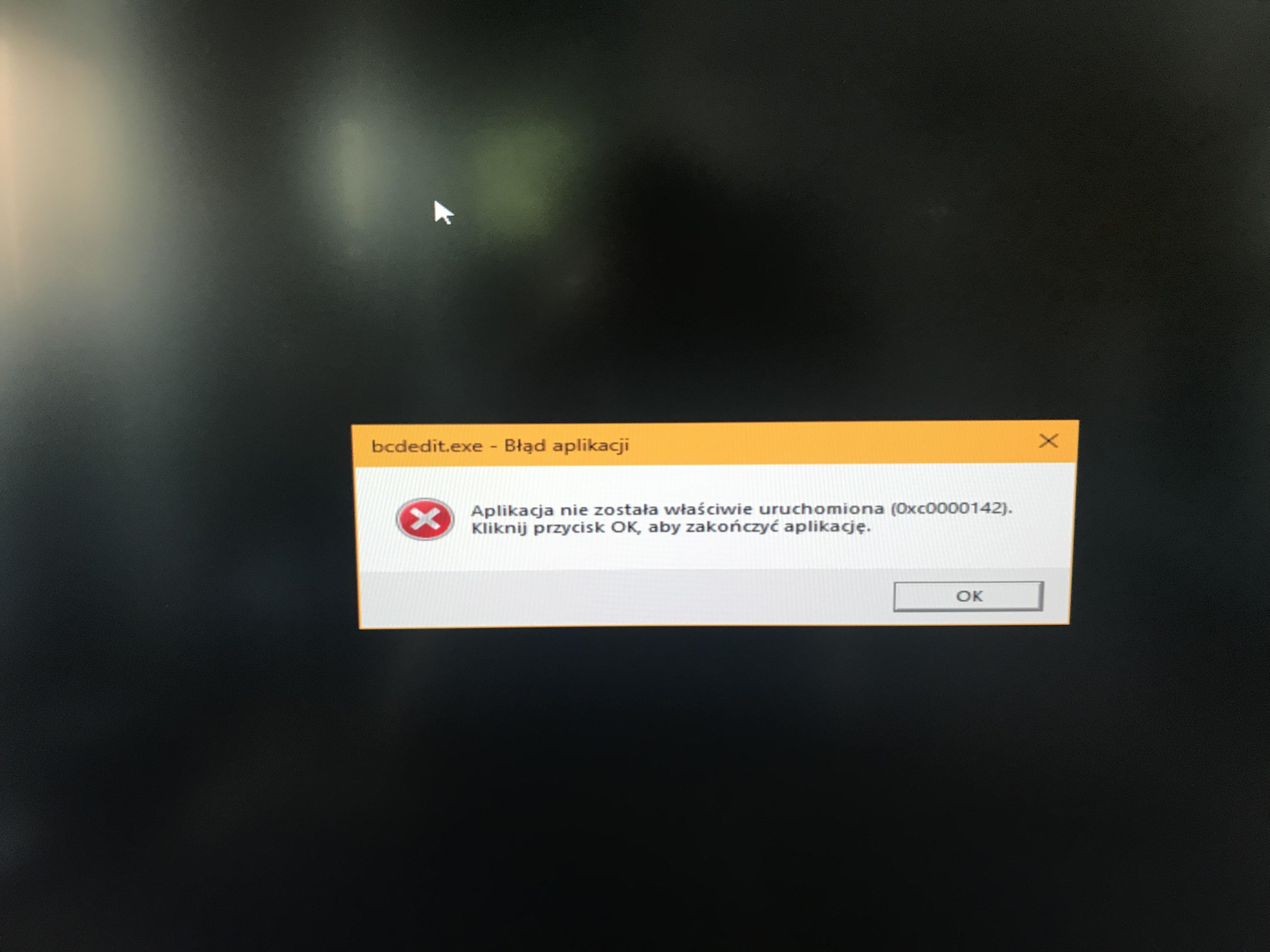
Witam, mam problem związany z aplikacją bcdedit.exe. Od pewnego czasu błąd ten pojawia się podczas odinstalowywania sterowników karty graficznej Nvidia za pomocą programu Display Driver Uninstaller (DDU). Gdy usuwam sterownik karty graficznej, wybieram ten program, następnie wchodzę do trybu awaryjnego systemu Windows, wybieram typ urządzenia (karta graficzna) i rodzaj urządzenia (Nvidia). W następnej kolejności wybieram: usuń sterownik i uruchom ponownie (zalecane) z listy wyboru. To właśnie podczas uruchomiania ponownego systemu Windows, zaraz po usunięciu sterownika w trybie awaryjnym wyświetla mi się ten błąd. Następnie komputer uruchamia się ponownie i mogę dalej instalować nowy sterownik karty graficznej. Czy ten błąd jest poważny, od czego zależy i jak mogę go naprawić? Pozdrawiam i proszę o pomoc.
-
Witam Was! Mam pewien problem. Mianowicie komputer zawiesza się podczas pracy w windowsie (przeglądanie WWW , słuchanie muzyki, oglądanie filmów) w grach natomiast wszystko działa poprawnie. Wygląda to dokładnie tak ,że obraz zawiesza się, kursor myszy przestaje reagować, czasem słychać spięcie dźwięku, jeżeli zdarzyło się to podczas słuchania muzyki. Nie mam pojęcia co się może dziać. Zestaw to : Procesor: intel core i5 2500k (nie kręcony) Płyta główna : ASRock P67 PRO3 (B3) Pamięci : GoodRAM 4.0 GHz Karta grafiki : Asus GeForce GTX 970 4 GB Dysk: WD Blue 1TB Zasilacz : Fortron ATX 600W SYSTEM OPERACYJNY: Windows 10 64 bity Proszę Was o pomoc. Z góry dziękuje za wskazówki.
-
Witam. Jestem zmuszony przeprowadzić się do innego pokoju z moim komputerem stacjonarnym. Wszystko działa dobrze w poprzednim. Okazała się, że gdy podłączyłem komputer w nowym pokoju do innego gniazdka zaczął pojawiać mi się ten komunikat przy starcie systemu. Co ciekawe poprzednio był tam też komputer i wszystko działało wtedy poprawnie (jednak był to inny komputer, też stacjonarny). Pamięć systemowa jest sprawna (sprawdzałem), dysk działa poprawnie i nie ma błędów (sprawdzałem), nie mam także żadnych wirusów (sprawdziłem programami Avast i Malwarebytes), sterowniki do wszystkich podzespołów i urządzeń systemowych są aktualne. Proszę o pomoc. Pozdrawiam PS: Dodam tylko, że oprócz niezbędnych urządzeń takich jak lampa nocna czy ładowarka do telefonu, nic innego nie było podłączone do pokoju, w którym wszystko działa. Natomiast, w tym pokoju, do którego muszę się przenieść muszę jeszcze podłączyć do tego samego gniazdka: TV, dekoder i livebox.
-
Mikouaj ---> Dzięki za komentarz. Faktycznie w Wiedźminie 2 temperatura jest najwyższa. Przy innych grach jest w granicach 65 maks st.C.
-
Podobno ta karta posiada jedno z najlepszych chłodzeń dostępnych na rynku z trzema wiatrakami. Karta kupiona niecały miesiąc temu. Nie ma żadnych artefaktów, ani błędów podczas korzystania z karty.
-
Czyli nie mam powodu do obaw ? W innych grach maksymalne temperatury to 54-67 st C. przy czym 67 Crysis w maksymalnych ustawieniach z vsync.
-
Witam ! Mam szybkie pytanie. Czy przy maksymalnym obciążeniu w Wiedźminie 2 ( wszystkie ustawienia na maksa + uberpróbkowanie + vsync ) temperatura karty GTX 670 Gigabyte OC 71 stopni Celsjusza jest ok ? Normalnie w idle mam 32 stopni Celsjusza ? Nigdy większej nie miałem w grze więc ta jest największa. Pozdrawiam.
-
Problem rozwiązany. Temat zamykam. W razie potrzeby piszcie.
-
Jak komputer włączam po dłuższym czekaniu np 2 h to wolno się włącza, natomiast jak włączę ponownie po chwili to się szybko wczytuje.
-
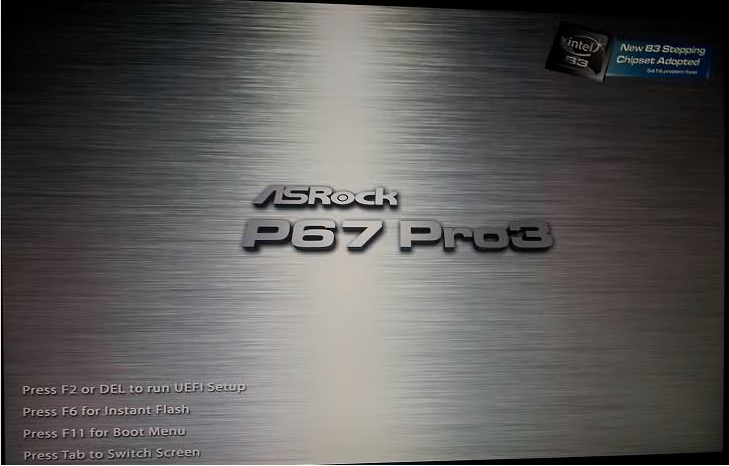
Cześć ! Od pewnego czasu posiadam nowy komputer i podczas włączania go pokazuje się przez około pół minuty do minuty. W lewym dolnym rogu, opcje po naciśnięciu danego klawisza niestety nie dają żądnych efektów. Bratu który ma 3 letni komputer włącza się szybciej niż mi o jakieś pół minuty. Po załadowaniu się tego loga pojawia się wczytywanie systemu. PS na płycie głównej pokazuje się : 62 / 98 / B2 / B3. Wersja biosu : 06/22/11 21:03:22 Ver : 04,06,04 Mój sprzęt : PROCESOR: Intel Core i5 2500K 3,3GHz, PŁYTA GŁóWNA : AsRock P67 PRO3(B3) Intel P67 LGA 1155, PAMIĘĆ RAM : DDR3 4096MB PC1333 CL9 (x2), KARTA GRAFICZNA : GIGABYTE GEFORCE GTX260 896MB, DYSK TWARDY : Seagate , MONITOR: SAMSUNG P2070, ZASILACZ : ATX FORTRON 600 W,
-
Tak problem aktywacji pozostaje. Czyli instalować system na czysto ? Podobno jeżeli bym zadzwonił do Microsoftu i poprosił o podanie klucza, ponieważ zmieniłem płytę główną a posiadam legalne oprogramowanie OEM mogą mi podać nowy klucz.
-
Mam podział dysków na C i D.
-
Witam ! Mam pytanie. Właśnie zamówiłem nową płytę główną, procesor i pamięć ram. Czy przy wymianie tych podzespołów będę musiał na nowo instalować system Windows ? Pozdrawiam. PS Mój aktualny komputer : Core 2 Duo E7400 2,8 Ghz 4 GB RAM GTX 260 896 MB V 216 Zasilacz : ATX Fortron 600 W Płyta główna : Gigabyte EP43-DS3 Obudowa jednostki centralnej : CoolerMaster Elite 330 System operacyjny : Windows 7 64 bit Nowe podzespoły : Intel Core i5 2500K AsRock Pro3 B3 2x Goodram 4GB DDR3 1333MHz
-
Aha ok. Czyli nie jest to nic poważnego ??? Dxdiag wyświetla się bez najmniejszych problemów.
-
Tak miałem problem z Dragon Age 2 gdy włączyłem tryb gry DirectX 10. Wyświetlał się komunikat Dragon Age 2 przestał działać. Przeinstalowałem sterowniki i niby jest ok. Zainstalowałem także wersje directx z płyty z gry. Czyli wniosek taki, ze jeżeli mam Windows 7 to ten directX web installer nie działa ???
-
Czyli jakieś rady???
-
DXError zawiera : [06/16/12 17:00:14] module: DXWSetup(Mar 30 2011), file: dxwsetup.cpp, line: 229, function: CDXWSetup::InitInstallEngine Sections are not initialized. -------------------- [06/16/12 17:00:14] module: DXWSetup(Mar 30 2011), file: psheets.cpp, line: 705, function: PreinstDlgProc CDXWSetup::InitInstallEngine() failed. -------------------- [06/16/12 17:00:52] module: DXWSetup(Mar 30 2011), file: dxwsetup.cpp, line: 229, function: CDXWSetup::InitInstallEngine Sections are not initialized. -------------------- [06/16/12 17:00:52] module: DXWSetup(Mar 30 2011), file: psheets.cpp, line: 705, function: PreinstDlgProc CDXWSetup::InitInstallEngine() failed. -------------------- [06/16/12 17:13:10] module: DXWSetup(Mar 30 2011), file: dxwsetup.cpp, line: 229, function: CDXWSetup::InitInstallEngine Sections are not initialized. -------------------- [06/16/12 17:13:10] module: DXWSetup(Mar 30 2011), file: psheets.cpp, line: 705, function: PreinstDlgProc CDXWSetup::InitInstallEngine() failed. -------------------- [06/16/12 17:28:00] module: DXWSetup(Mar 30 2011), file: dxwsetup.cpp, line: 229, function: CDXWSetup::InitInstallEngine Sections are not initialized. -------------------- [06/16/12 17:28:00] module: DXWSetup(Mar 30 2011), file: psheets.cpp, line: 705, function: PreinstDlgProc CDXWSetup::InitInstallEngine() failed. -------------------- [06/16/12 17:31:05] module: DXWSetup(Mar 30 2011), file: dxwsetup.cpp, line: 229, function: CDXWSetup::InitInstallEngine Sections are not initialized. -------------------- [06/16/12 17:31:05] module: DXWSetup(Mar 30 2011), file: psheets.cpp, line: 705, function: PreinstDlgProc CDXWSetup::InitInstallEngine() failed. -------------------- [06/16/12 17:58:45] module: DXWSetup(Mar 30 2011), file: dxwsetup.cpp, line: 229, function: CDXWSetup::InitInstallEngine Sections are not initialized. -------------------- [06/16/12 17:58:45] module: DXWSetup(Mar 30 2011), file: psheets.cpp, line: 705, function: PreinstDlgProc CDXWSetup::InitInstallEngine() failed. DirectX.log zawiera : 06/16/12 17:00:07: DXWSetup: ***** DXWSETUP ***** 06/16/12 17:00:07: DXWSetup: WinMain() 06/16/12 17:00:07: DXWSetup: IsIA64(): not IA64. 06/16/12 17:00:07: DXWSetup: Unable to get Version on target file C:\Windows\system32\directx\websetup\dsetup.dll 06/16/12 17:00:07: DXWSetup: Installed file C:\Windows\system32\directx\websetup\dsetup.dll 06/16/12 17:00:07: DXWSetup: Unable to get Version on target file C:\Windows\system32\directx\websetup\dsetup32.dll 06/16/12 17:00:07: DXWSetup: Installed file C:\Windows\system32\directx\websetup\dsetup32.dll 06/16/12 17:00:07: DXWSetup: GetDXVersion(): Unable to get RC string from registry. 06/16/12 17:00:07: DXWSetup: DirectX Version: 4.09.00.0904.00 06/16/12 17:00:07: DXWSetup: Setup Version: 4.09.00.0904.00 06/16/12 17:00:07: DXWSetup: A newer version of DirectX have been installed already. 06/16/12 17:00:14: DXWSetup: CDXWSetup::CDXWSetup() 06/16/12 17:00:14: DXWSetup: CDXWSetup::DownloadDXUpdate() 06/16/12 17:00:14: DXWSetup: OnEngineStatusChange(): EngineStatus = 0x1, SubStatus = 0x0 06/16/12 17:00:14: DXWSetup: OnEngineStatusChange(): EngineStatus = 0x3, SubStatus = 0x0 06/16/12 17:00:14: DXWSetup: OnEngineStatusChange(): EngineStatus = 0x2, SubStatus = 0x0 06/16/12 17:00:14: DXWSetup: OnStartInstall(): DLSize = 81, InstallSize = 0 06/16/12 17:00:14: DXWSetup: OnStartComponent(): ID = DXUpdate, DLSize = 81, InstallSize = 0, str = %DirectX_Setup% 06/16/12 17:00:14: DXWSetup: OnComponentProgress(): Phase = 0, Progress = 0 06/16/12 17:00:14: DXWSetup: OnStopComponent(): ID = DXUpdate, hr = 0x0, Phase = 9, str = %DirectX_Setup%, status = 0x0 06/16/12 17:00:14: DXWSetup: OnStopInstall(): hr = 0x0, str = (null), status = 0x0 06/16/12 17:00:14: DXWSetup: OnEngineStatusChange(): EngineStatus = 0x3, SubStatus = 0x0 06/16/12 17:00:14: DXWSetup: WM_APP_DOWNLOADDXUPDATE 06/16/12 17:00:14: DXWSetup: CDXWSetup::InitInstallEngine() 06/16/12 17:00:14: DXWSetup: CDXWSetup::InitInstallEngine(): Sections are not initialized. 06/16/12 17:00:14: DXWSetup: PreinstDlgProc(): CDXWSetup::InitInstallEngine() failed. 06/16/12 17:00:14: DXWSetup: WM_APP_ENDDOWNLOAD 06/16/12 17:00:26: DXWSetup: CDXWSetup::~CDXWSetup() 06/16/12 17:00:27: DXWSetup: CreatePropertySheet() returns -9. 06/16/12 17:00:27: DXWSetup: Deleted file C:\Windows\system32\directx\websetup\dsetup.dll. 06/16/12 17:00:27: DXWSetup: Deleted file C:\Windows\system32\directx\websetup\dsetup32.dll. 06/16/12 17:00:47: DXWSetup: ***** DXWSETUP ***** 06/16/12 17:00:47: DXWSetup: WinMain() 06/16/12 17:00:47: DXWSetup: IsIA64(): not IA64. 06/16/12 17:00:47: DXWSetup: Unable to get Version on target file C:\Windows\system32\directx\websetup\dsetup.dll 06/16/12 17:00:47: DXWSetup: Installed file C:\Windows\system32\directx\websetup\dsetup.dll 06/16/12 17:00:47: DXWSetup: Unable to get Version on target file C:\Windows\system32\directx\websetup\dsetup32.dll 06/16/12 17:00:47: DXWSetup: Installed file C:\Windows\system32\directx\websetup\dsetup32.dll 06/16/12 17:00:47: DXWSetup: GetDXVersion(): Unable to get RC string from registry. 06/16/12 17:00:47: DXWSetup: DirectX Version: 4.09.00.0904.00 06/16/12 17:00:47: DXWSetup: Setup Version: 4.09.00.0904.00 06/16/12 17:00:47: DXWSetup: A newer version of DirectX have been installed already. 06/16/12 17:00:52: DXWSetup: CDXWSetup::CDXWSetup() 06/16/12 17:00:52: DXWSetup: CDXWSetup::DownloadDXUpdate() 06/16/12 17:00:52: DXWSetup: OnEngineStatusChange(): EngineStatus = 0x1, SubStatus = 0x0 06/16/12 17:00:52: DXWSetup: OnEngineStatusChange(): EngineStatus = 0x3, SubStatus = 0x0 06/16/12 17:00:52: DXWSetup: OnEngineStatusChange(): EngineStatus = 0x2, SubStatus = 0x0 06/16/12 17:00:52: DXWSetup: OnStartInstall(): DLSize = 81, InstallSize = 0 06/16/12 17:00:52: DXWSetup: OnStartComponent(): ID = DXUpdate, DLSize = 81, InstallSize = 0, str = %DirectX_Setup% 06/16/12 17:00:52: DXWSetup: OnComponentProgress(): Phase = 0, Progress = 0 06/16/12 17:00:52: DXWSetup: OnStopComponent(): ID = DXUpdate, hr = 0x0, Phase = 9, str = %DirectX_Setup%, status = 0x0 06/16/12 17:00:52: DXWSetup: OnStopInstall(): hr = 0x0, str = (null), status = 0x0 06/16/12 17:00:52: DXWSetup: WM_APP_DOWNLOADDXUPDATE 06/16/12 17:00:52: DXWSetup: CDXWSetup::InitInstallEngine() 06/16/12 17:00:52: DXWSetup: CDXWSetup::InitInstallEngine(): Sections are not initialized. 06/16/12 17:00:52: DXWSetup: PreinstDlgProc(): CDXWSetup::InitInstallEngine() failed. 06/16/12 17:00:52: DXWSetup: WM_APP_ENDDOWNLOAD 06/16/12 17:12:50: DXWSetup: ***** DXWSETUP ***** 06/16/12 17:12:50: DXWSetup: WinMain() 06/16/12 17:12:59: DXWSetup: CDXWSetup::~CDXWSetup() 06/16/12 17:13:01: DXWSetup: CreatePropertySheet() returns -9. 06/16/12 17:13:01: DXWSetup: Deleted file C:\Windows\system32\directx\websetup\dsetup.dll. 06/16/12 17:13:01: DXWSetup: Deleted file C:\Windows\system32\directx\websetup\dsetup32.dll. 06/16/12 17:13:06: DXWSetup: ***** DXWSETUP ***** 06/16/12 17:13:06: DXWSetup: WinMain() 06/16/12 17:13:06: DXWSetup: IsIA64(): not IA64. 06/16/12 17:13:06: DXWSetup: Unable to get Version on target file C:\Windows\system32\directx\websetup\dsetup.dll 06/16/12 17:13:06: DXWSetup: Installed file C:\Windows\system32\directx\websetup\dsetup.dll 06/16/12 17:13:06: DXWSetup: Unable to get Version on target file C:\Windows\system32\directx\websetup\dsetup32.dll 06/16/12 17:13:06: DXWSetup: Installed file C:\Windows\system32\directx\websetup\dsetup32.dll 06/16/12 17:13:06: DXWSetup: GetDXVersion(): Unable to get RC string from registry. 06/16/12 17:13:06: DXWSetup: DirectX Version: 4.09.00.0904.00 06/16/12 17:13:06: DXWSetup: Setup Version: 4.09.00.0904.00 06/16/12 17:13:06: DXWSetup: A newer version of DirectX have been installed already. 06/16/12 17:13:10: DXWSetup: CDXWSetup::CDXWSetup() 06/16/12 17:13:10: DXWSetup: CDXWSetup::DownloadDXUpdate() 06/16/12 17:13:10: DXWSetup: OnEngineStatusChange(): EngineStatus = 0x1, SubStatus = 0x0 06/16/12 17:13:10: DXWSetup: OnEngineStatusChange(): EngineStatus = 0x3, SubStatus = 0x0 06/16/12 17:13:10: DXWSetup: OnEngineStatusChange(): EngineStatus = 0x2, SubStatus = 0x0 06/16/12 17:13:10: DXWSetup: OnStartInstall(): DLSize = 81, InstallSize = 0 06/16/12 17:13:10: DXWSetup: OnStartComponent(): ID = DXUpdate, DLSize = 81, InstallSize = 0, str = %DirectX_Setup% 06/16/12 17:13:10: DXWSetup: OnComponentProgress(): Phase = 0, Progress = 0 06/16/12 17:13:10: DXWSetup: OnStopComponent(): ID = DXUpdate, hr = 0x0, Phase = 9, str = %DirectX_Setup%, status = 0x0 06/16/12 17:13:10: DXWSetup: OnStopInstall(): hr = 0x0, str = (null), status = 0x0 06/16/12 17:13:10: DXWSetup: OnEngineStatusChange(): EngineStatus = 0x3, SubStatus = 0x0 06/16/12 17:13:10: DXWSetup: WM_APP_DOWNLOADDXUPDATE 06/16/12 17:13:10: DXWSetup: CDXWSetup::InitInstallEngine() 06/16/12 17:13:10: DXWSetup: CDXWSetup::InitInstallEngine(): Sections are not initialized. 06/16/12 17:13:10: DXWSetup: PreinstDlgProc(): CDXWSetup::InitInstallEngine() failed. 06/16/12 17:13:10: DXWSetup: WM_APP_ENDDOWNLOAD 06/16/12 17:13:12: DXWSetup: CDXWSetup::~CDXWSetup() 06/16/12 17:13:13: DXWSetup: CreatePropertySheet() returns -9. 06/16/12 17:13:13: DXWSetup: Deleted file C:\Windows\system32\directx\websetup\dsetup.dll. 06/16/12 17:13:13: DXWSetup: Deleted file C:\Windows\system32\directx\websetup\dsetup32.dll. 06/16/12 17:27:56: DXWSetup: ***** DXWSETUP ***** 06/16/12 17:27:56: DXWSetup: WinMain() 06/16/12 17:27:56: DXWSetup: IsIA64(): not IA64. 06/16/12 17:27:56: DXWSetup: Unable to get Version on target file C:\Windows\system32\directx\websetup\dsetup.dll 06/16/12 17:27:56: DXWSetup: Installed file C:\Windows\system32\directx\websetup\dsetup.dll 06/16/12 17:27:56: DXWSetup: Unable to get Version on target file C:\Windows\system32\directx\websetup\dsetup32.dll 06/16/12 17:27:56: DXWSetup: Installed file C:\Windows\system32\directx\websetup\dsetup32.dll 06/16/12 17:27:56: DXWSetup: GetDXVersion(): Unable to get RC string from registry. 06/16/12 17:27:56: DXWSetup: DirectX Version: 4.09.00.0904.00 06/16/12 17:27:56: DXWSetup: Setup Version: 4.09.00.0904.00 06/16/12 17:27:56: DXWSetup: A newer version of DirectX have been installed already. 06/16/12 17:28:00: DXWSetup: CDXWSetup::CDXWSetup() 06/16/12 17:28:00: DXWSetup: CDXWSetup::DownloadDXUpdate() 06/16/12 17:28:00: DXWSetup: OnEngineStatusChange(): EngineStatus = 0x1, SubStatus = 0x0 06/16/12 17:28:00: DXWSetup: OnEngineStatusChange(): EngineStatus = 0x3, SubStatus = 0x0 06/16/12 17:28:00: DXWSetup: OnEngineStatusChange(): EngineStatus = 0x2, SubStatus = 0x0 06/16/12 17:28:00: DXWSetup: OnStartInstall(): DLSize = 81, InstallSize = 0 06/16/12 17:28:00: DXWSetup: OnStartComponent(): ID = DXUpdate, DLSize = 81, InstallSize = 0, str = %DirectX_Setup% 06/16/12 17:28:00: DXWSetup: OnComponentProgress(): Phase = 0, Progress = 0 06/16/12 17:28:00: DXWSetup: OnStopComponent(): ID = DXUpdate, hr = 0x0, Phase = 9, str = %DirectX_Setup%, status = 0x0 06/16/12 17:28:00: DXWSetup: OnStopInstall(): hr = 0x0, str = (null), status = 0x0 06/16/12 17:28:00: DXWSetup: WM_APP_DOWNLOADDXUPDATE 06/16/12 17:28:00: DXWSetup: CDXWSetup::InitInstallEngine() 06/16/12 17:28:00: DXWSetup: CDXWSetup::InitInstallEngine(): Sections are not initialized. 06/16/12 17:28:00: DXWSetup: PreinstDlgProc(): CDXWSetup::InitInstallEngine() failed. 06/16/12 17:28:00: DXWSetup: WM_APP_ENDDOWNLOAD 06/16/12 17:28:09: DXWSetup: CDXWSetup::~CDXWSetup() 06/16/12 17:28:10: DXWSetup: CreatePropertySheet() returns -9. 06/16/12 17:28:11: DXWSetup: Deleted file C:\Windows\system32\directx\websetup\dsetup.dll. 06/16/12 17:28:11: DXWSetup: Deleted file C:\Windows\system32\directx\websetup\dsetup32.dll. 06/16/12 17:31:00: DXWSetup: ***** DXWSETUP ***** 06/16/12 17:31:00: DXWSetup: WinMain() 06/16/12 17:31:00: DXWSetup: IsIA64(): not IA64. 06/16/12 17:31:00: DXWSetup: Unable to get Version on target file C:\Windows\system32\directx\websetup\dsetup.dll 06/16/12 17:31:00: DXWSetup: Installed file C:\Windows\system32\directx\websetup\dsetup.dll 06/16/12 17:31:00: DXWSetup: Unable to get Version on target file C:\Windows\system32\directx\websetup\dsetup32.dll 06/16/12 17:31:00: DXWSetup: Installed file C:\Windows\system32\directx\websetup\dsetup32.dll 06/16/12 17:31:00: DXWSetup: GetDXVersion(): Unable to get RC string from registry. 06/16/12 17:31:00: DXWSetup: DirectX Version: 4.09.00.0904.00 06/16/12 17:31:00: DXWSetup: Setup Version: 4.09.00.0904.00 06/16/12 17:31:00: DXWSetup: A newer version of DirectX have been installed already. 06/16/12 17:31:05: DXWSetup: CDXWSetup::CDXWSetup() 06/16/12 17:31:05: DXWSetup: CDXWSetup::DownloadDXUpdate() 06/16/12 17:31:05: DXWSetup: OnEngineStatusChange(): EngineStatus = 0x1, SubStatus = 0x0 06/16/12 17:31:05: DXWSetup: OnEngineStatusChange(): EngineStatus = 0x3, SubStatus = 0x0 06/16/12 17:31:05: DXWSetup: OnEngineStatusChange(): EngineStatus = 0x2, SubStatus = 0x0 06/16/12 17:31:05: DXWSetup: OnStartInstall(): DLSize = 81, InstallSize = 0 06/16/12 17:31:05: DXWSetup: OnStartComponent(): ID = DXUpdate, DLSize = 81, InstallSize = 0, str = %DirectX_Setup% 06/16/12 17:31:05: DXWSetup: OnComponentProgress(): Phase = 0, Progress = 0 06/16/12 17:31:05: DXWSetup: OnStopComponent(): ID = DXUpdate, hr = 0x0, Phase = 9, str = %DirectX_Setup%, status = 0x0 06/16/12 17:31:05: DXWSetup: OnStopInstall(): hr = 0x0, str = (null), status = 0x0 06/16/12 17:31:05: DXWSetup: OnEngineStatusChange(): EngineStatus = 0x3, SubStatus = 0x0 06/16/12 17:31:05: DXWSetup: WM_APP_DOWNLOADDXUPDATE 06/16/12 17:31:05: DXWSetup: CDXWSetup::InitInstallEngine() 06/16/12 17:31:05: DXWSetup: CDXWSetup::InitInstallEngine(): Sections are not initialized. 06/16/12 17:31:05: DXWSetup: PreinstDlgProc(): CDXWSetup::InitInstallEngine() failed. 06/16/12 17:31:05: DXWSetup: WM_APP_ENDDOWNLOAD 06/16/12 17:36:34: DXWSetup: CDXWSetup::~CDXWSetup() 06/16/12 17:36:35: DXWSetup: CreatePropertySheet() returns -9. 06/16/12 17:36:35: DXWSetup: Deleted file C:\Windows\system32\directx\websetup\dsetup.dll. 06/16/12 17:36:35: DXWSetup: Deleted file C:\Windows\system32\directx\websetup\dsetup32.dll. 06/16/12 17:58:41: DXWSetup: ***** DXWSETUP ***** 06/16/12 17:58:41: DXWSetup: WinMain() 06/16/12 17:58:41: DXWSetup: IsIA64(): not IA64. 06/16/12 17:58:41: DXWSetup: Unable to get Version on target file C:\Windows\system32\directx\websetup\dsetup.dll 06/16/12 17:58:41: DXWSetup: Installed file C:\Windows\system32\directx\websetup\dsetup.dll 06/16/12 17:58:41: DXWSetup: Unable to get Version on target file C:\Windows\system32\directx\websetup\dsetup32.dll 06/16/12 17:58:41: DXWSetup: Installed file C:\Windows\system32\directx\websetup\dsetup32.dll 06/16/12 17:58:41: DXWSetup: GetDXVersion(): Unable to get RC string from registry. 06/16/12 17:58:41: DXWSetup: DirectX Version: 4.09.00.0904.00 06/16/12 17:58:41: DXWSetup: Setup Version: 4.09.00.0904.00 06/16/12 17:58:41: DXWSetup: A newer version of DirectX have been installed already. 06/16/12 17:58:44: DXWSetup: CDXWSetup::CDXWSetup() 06/16/12 17:58:44: DXWSetup: CDXWSetup::DownloadDXUpdate() 06/16/12 17:58:44: DXWSetup: OnEngineStatusChange(): EngineStatus = 0x1, SubStatus = 0x0 06/16/12 17:58:44: DXWSetup: OnEngineStatusChange(): EngineStatus = 0x3, SubStatus = 0x0 06/16/12 17:58:44: DXWSetup: OnEngineStatusChange(): EngineStatus = 0x2, SubStatus = 0x0 06/16/12 17:58:44: DXWSetup: OnStartInstall(): DLSize = 81, InstallSize = 0 06/16/12 17:58:44: DXWSetup: OnStartComponent(): ID = DXUpdate, DLSize = 81, InstallSize = 0, str = %DirectX_Setup% 06/16/12 17:58:44: DXWSetup: OnComponentProgress(): Phase = 0, Progress = 0 06/16/12 17:58:45: DXWSetup: OnStopComponent(): ID = DXUpdate, hr = 0x0, Phase = 9, str = %DirectX_Setup%, status = 0x0 06/16/12 17:58:45: DXWSetup: OnStopInstall(): hr = 0x0, str = (null), status = 0x0 06/16/12 17:58:45: DXWSetup: OnEngineStatusChange(): EngineStatus = 0x3, SubStatus = 0x0 06/16/12 17:58:45: DXWSetup: WM_APP_DOWNLOADDXUPDATE 06/16/12 17:58:45: DXWSetup: CDXWSetup::InitInstallEngine() 06/16/12 17:58:45: DXWSetup: CDXWSetup::InitInstallEngine(): Sections are not initialized. 06/16/12 17:58:45: DXWSetup: PreinstDlgProc(): CDXWSetup::InitInstallEngine() failed. 06/16/12 17:58:45: DXWSetup: WM_APP_ENDDOWNLOAD
-
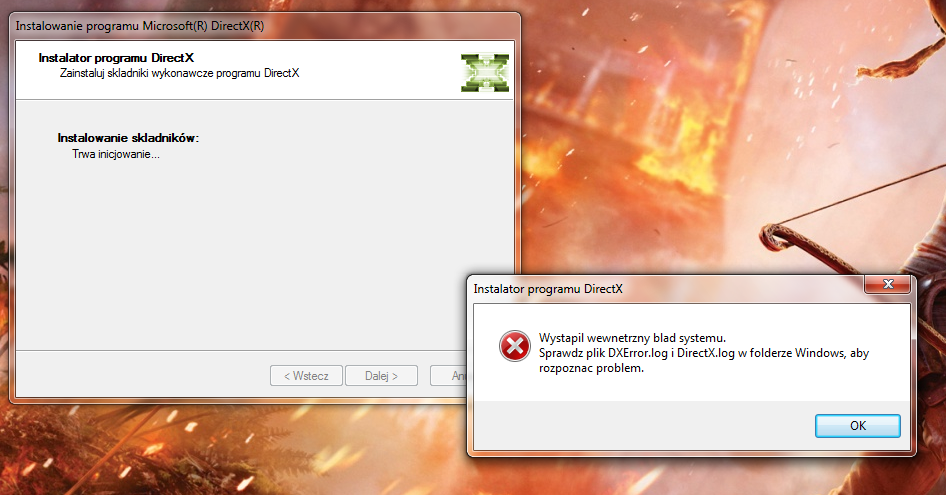
Witam ! Mam pewien mały problem przy aktualizacji bibliotek DirectX z poziomu DirectX Web Installer. Poprzednio przed uaktualnieniem systemu z Vista do 7 na Viście tego problemu nie było. instalowałem także wersje kompletną DirectX 9.29.1974 Redistributable z instalatora. Bez najmniejszego problemu się ona zainstalowała, natomiast jeżeli chce zainstalować z web installer to wyświetla się poniższy komunikat ... Za wszystkie pomocne rady dziękuje i proszę o pomoc ...
-
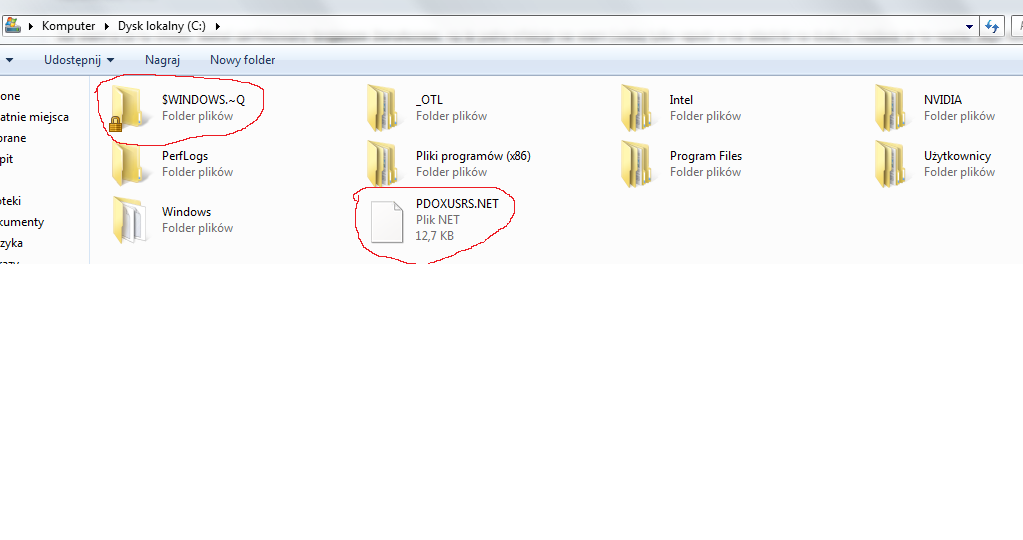
Mam jeszcze jedno pytanie. Co to za dziwny folder i plik ? Edit Jestem pod ogromnym wrażaniem twojej wiedzy. Dziękuję za pomoc po stokroć. Twoje uwagi i opinie są bezcenne. Jeszcze raz dziękuję. :)
-
SystemLook 30.07.11 by jpshortstuff Log created at 21:57 on 31/05/2012 by Gabriel Administrator - Elevation successful ========== folderfind ========== Searching for "{5195b7c7-c031-1397-372b-fcbeee02d2f6}" No folders found. -= EOF =- EDIT Wynik wyszukiwania z nowego konta użytkownika. Poprzednie usunąłem.
-
Plik został przesłany na PW.